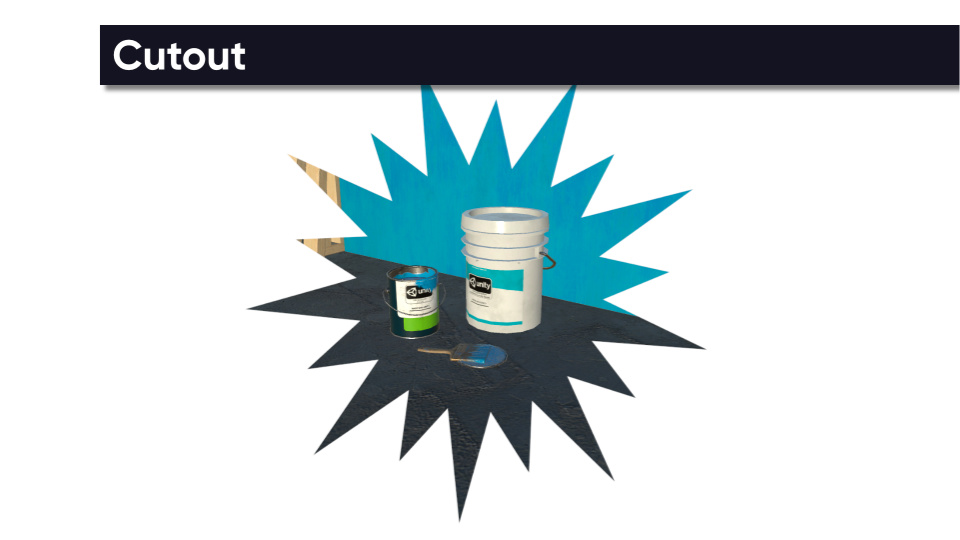
The Cutout effect takes a texture (which usually has a part taken out of the middle with zero alpha) and overlays the texture onto the scene.
This effect requires the Cutout Texture to be set in order to work properly. A collection of textures is supplied in Resources/Textures/Cutout.
Parameters
- Enabled - Is the effect active?
- Cutout Texture - The texture to use for the cutout. Pixels inside the texture with an alpha of zero become cut out in the center.
- Border Color - Color to apply to the outer edges of the cutout texture where alpha is greater that zero.
- Stretch - Should the texture stretch to fit the screen? If false, the texture keeps its original aspect ratio.
- Zoom - The level of zoom to apply to the cutout texture.
- Offset - An offset to apply to the cutout texture.
- Rotation - Amount of rotation, in degrees, to apply to the cutout texture. The rotation is applied anti-clockwise.