In Part 4, we learned all about the depth buffer, and how we can read from it to create shaders such as a silhouette effect. In Part 5, we are going to write some vertex displacement effects and learn about tessellation shaders.
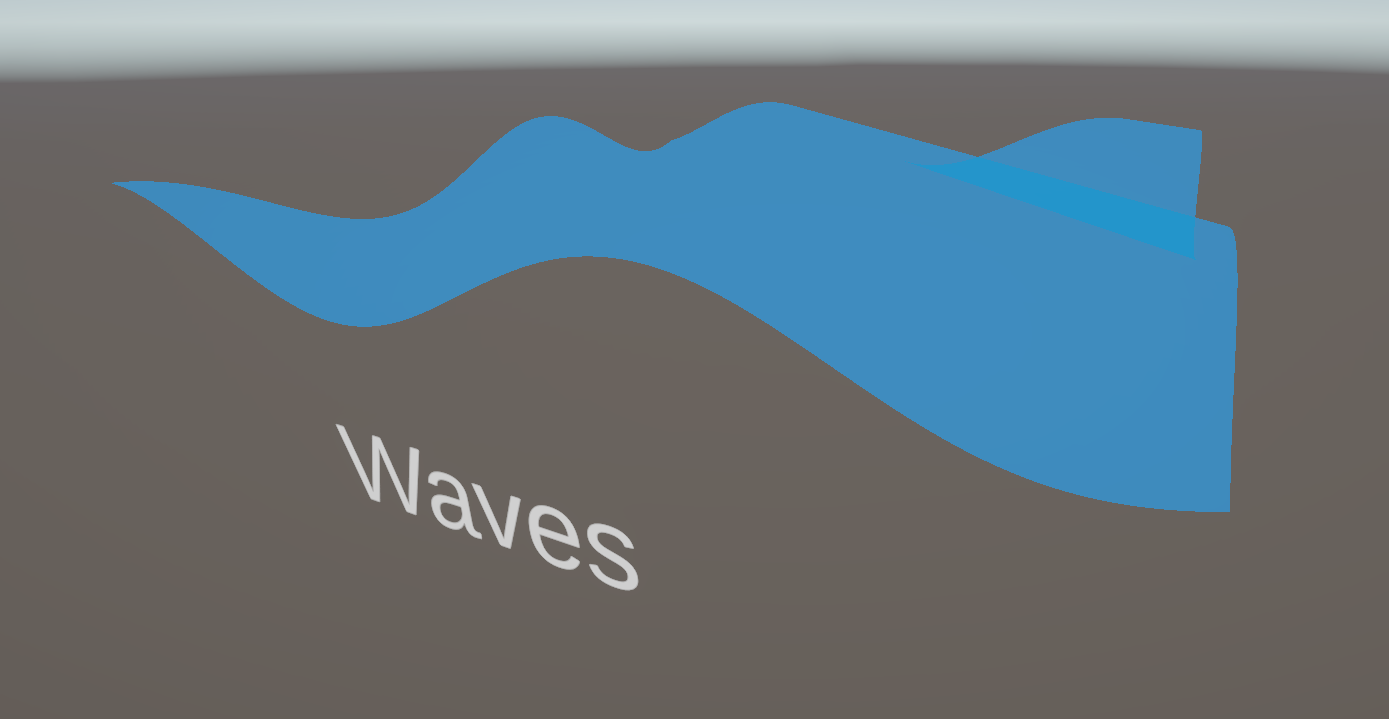
So far, most of our attention has been drawn to the fragment shader, which is typically where we can make more interesting visuals, but there’s plenty we can do in the vertex shader, too. Primarily, fragment shaders can’t be used to physically move the vertices of a mesh around, but we can do that in the vertex shader before we output clip-space positions.
In fact, our vertex shader’s main goal right now is to move vertices around - only, it’s transforming them from object space, where each position is relative to the mesh pivot point, to clip space, where positions are relative to the screen. We don’t need to do this transformation in one go though, as there are other useful spaces in between, like world space. We can transform from object to world space, apply a sine wave pattern offset to our vertices, then transform these new points from world to clip space.
I’m going to copy the AlphaBlendedTransparency shader from Part 3 (because I want our wave to be transparent by default, but maybe you want the option to change the blend mode) and rename the new copy Waves, starting with this code:
Shader "Basics/Waves"
{
    Properties
    {
        _BaseColor("Base Color", Color) = (1, 1, 1, 1)
        _BaseTexture("Base Texture", 2D) = "white" {}
        [Enum(UnityEngine.Rendering.BlendMode)] _SrcBlend("Source Blend Mode", Integer) = 5
        [Enum(UnityEngine.Rendering.BlendMode)] _DstBlend("Destination Blend Mode", Integer) = 10
    }
    SubShader
    {
        Tags
        {
            "RenderPipeline" = "UniversalPipeline"
            "RenderType" = "Transparent"
            "Queue" = "Transparent"
        }

        Pass
        {
            Blend [_SrcBlend] [_DstBlend]
            ZWrite Off

            HLSLPROGRAM
            #pragma vertex vert
            #pragma fragment frag

            #include "Packages/com.unity.render-pipelines.universal/ShaderLibrary/Core.hlsl"

            CBUFFER_START(UnityPerMaterial)
                float4 _BaseColor;
                float4 _BaseTexture_ST;
            CBUFFER_END

            TEXTURE2D(_BaseTexture);
            SAMPLER(sampler_BaseTexture);

            struct appdata
            {
                float4 positionOS : POSITION;
                float2 uv : TEXCOORD0;
            };

            struct v2f
            {
                float4 positionCS : SV_POSITION;
                float2 uv : TEXCOORD0;
            };

            v2f vert(appdata v)
            {
                v2f o = (v2f)0;

                o.positionCS = TransformObjectToHClip(v.positionOS.xyz);
                o.uv = TRANSFORM_TEX(v.uv, _BaseTexture);

                return o;
            }

            float4 frag(v2f i) : SV_TARGET
            {
                float4 textureColor = SAMPLE_TEXTURE2D(_BaseTexture, sampler_BaseTexture, i.uv);
                return textureColor * _BaseColor;
            }

            ENDHLSL
        }
    }
}
It’s worth noting that this doesn’t need to be a transparent shader if you want to make a stylized water effect, so you could choose to build off an opaque shader like BasicTexturing if you so desire.
To start, let’s add a couple of new properties. The first is a _WaveHeight, which will define how high or low the waves can reach along the y-axis. We can make it a Range property between 0 and 1 so that it has a nice slider when viewed in the Inspector, and I’ll give it a default of 0.25. The second is called _WaveSpeed, which defines how quickly the sine wave pattern rolls across the mesh. This one can be a Range with a larger max value than _WaveHeight - something like 10.0 should do - and I’ll give it a default value of 1.0.
Properties
{
    _BaseColor("Base Color", Color) = (1, 1, 1, 1)
    _BaseTexture("Base Texture", 2D) = "white" {}
    _WaveHeight("Wave Height", Range(0.0, 1.0)) = 0.25
    _WaveSpeed("Wave Speed", Range(0.0, 10.0)) = 1.0
    [Enum(UnityEngine.Rendering.BlendMode)] _SrcBlend("Source Blend Mode", Integer) = 5
    [Enum(UnityEngine.Rendering.BlendMode)] _DstBlend("Destination Blend Mode", Integer) = 10
}
Remember to also define these variables inside the CBUFFER, where both are float types.
CBUFFER_START(UnityPerMaterial)
    float4 _BaseColor;
    float4 _BaseTexture_ST;
    float _WaveHeight;
    float _WaveSpeed;
CBUFFER_END
Jumping down to the vertex shader function, it’s time to add the wave pattern offset. Let’s remove the line where we calculate positionCS for now, and instead let’s get the position in world space. You can apply the waves in any space you want, but I prefer to do this bit in world space because that allows me to tile a mesh using this shader along the x-z plane, and adjacent meshes will have their waves line up correctly since I’d be using the same x-z position as input to the sine function at the boundaries. If I were to do this in object space, I might not be able to tile them unless I set up my mesh and the material properties very carefully.
To get the world-space position, I can use the TransformObjectToWorld function and feed in the positionOS from appdata. Next, we need to work out how high the waves are at each point on the surface by using the sin function, which is built into HLSL. I want the waves to travel across the mesh diagonally along the x-z direction, so I will add the x- and z-components of the world space position and pass it into the sin function. I will also add _Time.y to this value (a timer which increases by 1.0 each second) to make the waves scroll automatically, and multiply the _Time.y by _WaveSpeed to give us control over the speed. The sin function gives us an output between -1 and +1, so we can multiply its result by _WaveHeight to give us a wave displacement value.
Now, all we need to do is create a new position vector where each component is the same as positionWS, except we add waveHeight to the y-component, and then we can pass this position into the TransformWorldToHClip to give us the final positionCS output we needed. This function is similar in name to TransformObjectToHClip, which we have been using so far, but of course we are now using a world-space position instead of an object-space position. Be careful to choose the correct transformation functions when you’re doing vertex displacement!
v2f vert(appdata v)
{
    v2f o = (v2f)0;

    float3 positionWS = TransformObjectToWorld(v.positionOS.xyz);

    float waveHeight = sin(positionWS.x + positionWS.z + _Time.y * _WaveSpeed) * _WaveHeight;
    float3 newPositionWS = float3(positionWS.x, positionWS.y + waveHeight, positionWS.z);

    o.positionCS = TransformWorldToHClip(newPositionWS);
    o.uv = TRANSFORM_TEX(v.uv, _BaseTexture);

    return o;
}
In the Scene View, if we assign this material to a primitive plane mesh, then you’ll see the waves in action, and you can play around with the _WaveHeight and _WaveSpeed properties to change the behavior of the wave plane. However, if you view the mesh at certain angles, you’ll see that the wave crests are very jagged, which is far from ideal.
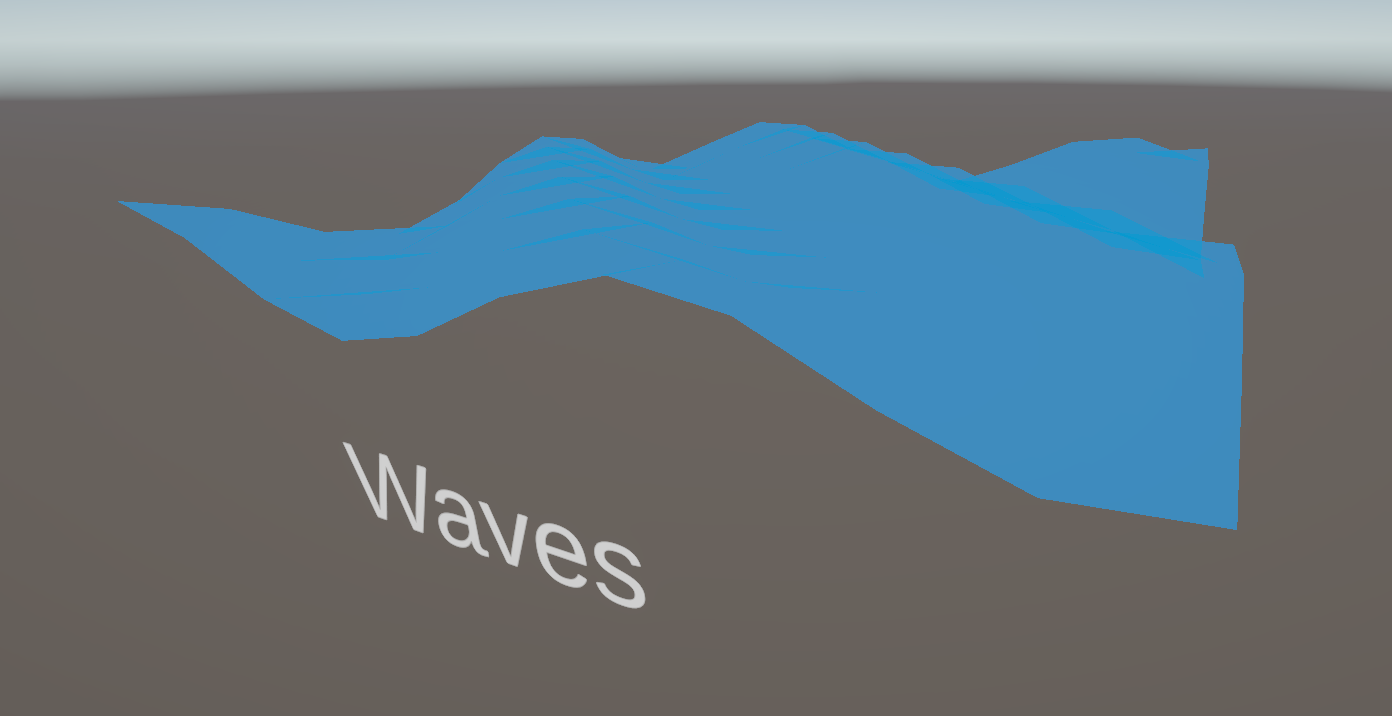
There are a handful of ways to fix it. The most obvious is to just use a custom mesh with more vertices, which visually fixes the issue, but introduces new problems: you need to create a higher-poly mesh for any case where you need a displacement effect like this one, which might clutter up your project with high- and low-poly versions of essentially the same object. Also, when you zoom out, you would still be processing a high number of vertices, which is wasted performance, so you may want to create some sort of LOD system where you swap in a low-poly variant of the mesh at a high distance from the mesh, although this still incurs a memory hit since you need to hold both meshes in memory. These are perfectly fine approaches to take to solve this problem, and they might be adequate for your project, but I think there’s another approach which could suit your game better.
Subscribe to my Patreon for perks including early access, your name in the credits of my videos, and bonus access to several premium shader packs!

Tessellation
It might be better if you only needed to author a low-poly version of the mesh, and then let the GPU increase the vertex density on the fly. This can be preferable to an LOD system which swaps meshes at runtime, since we don’t need to add any detail to the shape of the base mesh - we only want the additional vertices to increase the resolution of the displacement effect.
The basic pipeline I presented in Part 1 went a bit like this: you start with mesh data, you apply the vertex shader to that data, the vertices are rasterized into fragments, and you run the fragment shader on those to get screen output colors. However, I left out many optional stages like tessellation, which happens just after the vertex shader and before rasterization.
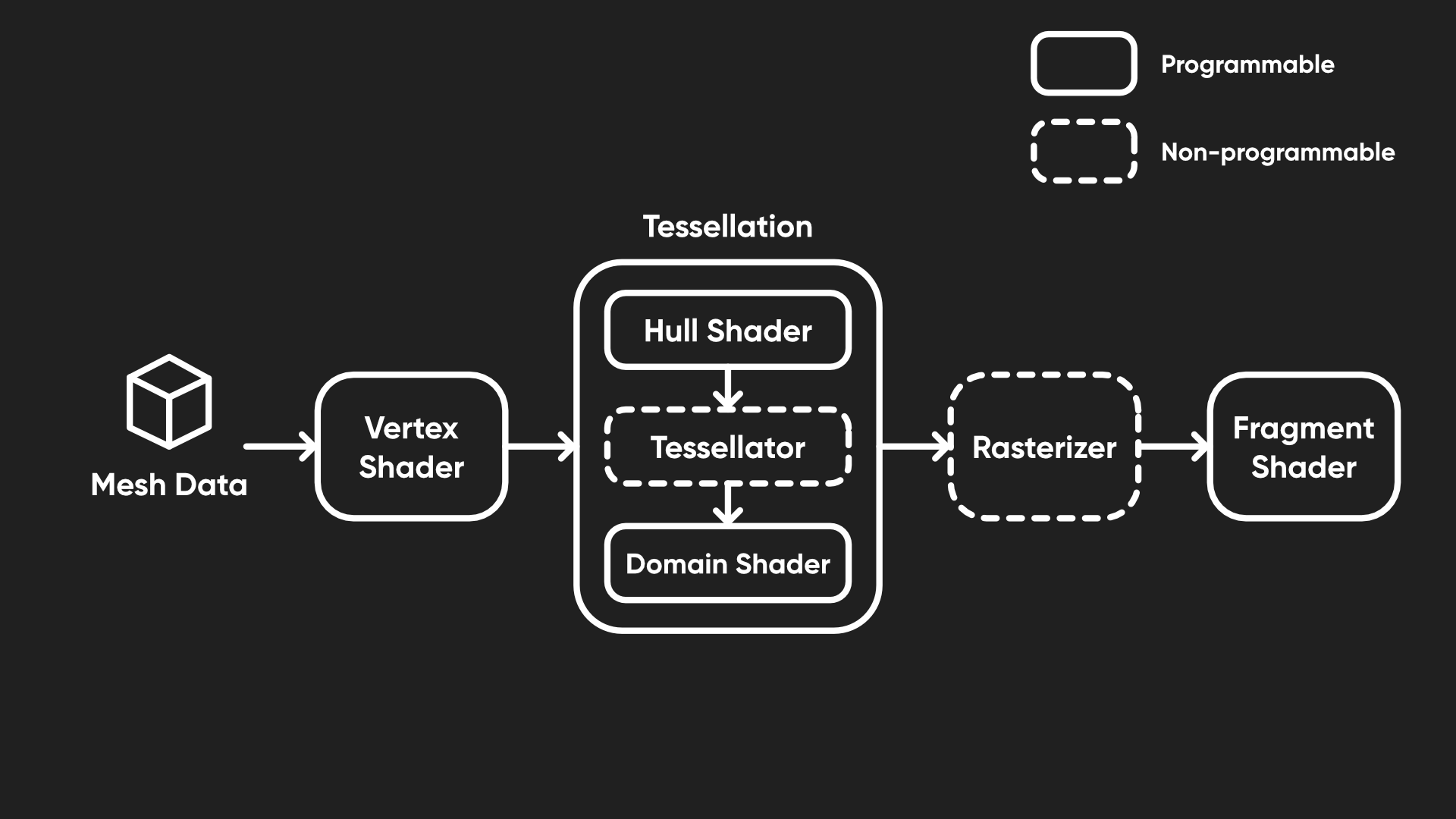
Tessellation happens across a handful of new shader stages which are responsible for taking the vertices output by the vertex shader and (potentially) creating new vertices between them, namely the hull shader and domain shader, both of which we can program, and the tessellation primitive generator between them, which runs automatically. It’s quite terminology-dense and you might not really need tessellation until much later in your shader journey, so there’s no shame in skipping to Part 6 (which is all about lighting) and coming back here another time when you’re more comfortable with shaders!
You can modify the Waves shader which we just created if you’d like, but I’m going to branch off a copy called TessellatedWaves.
Shader "Basics/TessellatedWaves"
{
    ...
}
First, let’s add a few properties. We’ll need a _TessellationAmount, which defines how many times we should subdivide the mesh (i.e. how many times we insert a new vertex between an existing pair of vertices). I’m pretty sure the hardware limit here is 64 (on my system, at least), which is far more than you’ll realistically ever need, so let’s set the Range to between 1 (which performs no subdivisions) and 64.
I also want the number of subdivisions to decrease smoothly as we move the camera far away from the mesh. If we always use the full _TessellationAmount, even if we are far away, then we won’t be seeing much of a benefit but it’ll still be draining resources. Make no mistake: tessellation can be rather expensive, especially if you spam 64 subdivisions on everything in sight. With that in mind, I’ll set a _TessellationFadeStart distance, where the amount of tessellation begins to drop off from the _TessellationAmount value we set, and a _TessellationFadeEnd, which is the distance at which the number of subdivisions falls to 1 (i.e. doing no tessellation).
Properties
{
    _BaseColor("Base Color", Color) = (1, 1, 1, 1)
    _BaseTexture("Base Texture", 2D) = "white" {}
    _WaveHeight("Wave Height", Range(0.0, 1.0)) = 0.25
    _WaveSpeed("Wave Speed", Range(0.0, 10.0)) = 1.0
    _TessellationAmount("Tessellation Amount", Range(1.0, 64.0)) = 1.0
    _TessellationFadeStart("Tessellation Fade Start", Float) = 25
    _TessellationFadeEnd("Tessellation Fade End", Float) = 50
    [Enum(UnityEngine.Rendering.BlendMode)] _SrcBlend("Source Blend Mode", Integer) = 5
    [Enum(UnityEngine.Rendering.BlendMode)] _DstBlend("Destination Blend Mode", Integer) = 10
}
Remember to define each of these new properties in the CBUFFER too.
CBUFFER_START(UnityPerMaterial)
    float4 _BaseColor;
    float4 _BaseTexture_ST;
    float _WaveHeight;
    float _WaveSpeed;
    float _TessellationAmount;
    float _TessellationFadeStart;
    float _TessellationFadeEnd;
CBUFFER_END
Next, let’s talk about the structure of this shader. Since we are adding an entire new kind of shader, it will look quite different to what we are used to. We still need the appdata struct to retrieve mesh data for usage in the vertex shader, but this time, we won’t be passing data straight from vertex to fragment - instead, the vertex shader will send its outputs to the first tessellation stage, called the hull shader.
This hull shader is responsible for setting up data ready for tessellation, and it accepts a patch of vertices - this is a primitive type like a triangle or quad, but I’m just going to use triangles. Then, it outputs triangles one at a time to the tessellation primitive generator (or just the tessellator) which spits out a stream of new vertices alongside the existing ones.
So, that means our vertex shader will output instances of a new struct called tessControlPoint instead of v2f (but let’s keep the v2f struct in the code for now). This control point will contain a position in world space, and this time the semantic is called INTERNALTESSPOS instead of SV_POSITION. We shall also pass a UV to the hull shader, although we can use the regular TEXCOORD0 semantic for that.
struct appdata
{
    float4 positionOS : POSITION;
    float2 uv : TEXCOORD0;
};

struct tessControlPoint
{
    float3 positionWS : INTERNALTESSPOS;
    float2 uv : TEXCOORD0;
};

struct v2f
{
    float4 positionCS : SV_POSITION;
    float2 uv : TEXCOORD0;
};
With the tessControlPoint struct set up, let’s rewrite the vert function. Its return type will be tessControlPoint, and we’ll create an instance of one of those instead of v2f inside the function body. Since I want to output a world-space position, I will use the TransformObjectToWorld function which we saw earlier in this tutorial, and for the UVs I can use the same TRANSFORM_TEX macro that we are used to. We won’t calculate anything to do with waves here - that comes later after tessellation.
tessControlPoint vert(appdata v)
{
    tessControlPoint o = (tessControlPoint)0;

    o.positionWS = TransformObjectToWorld(v.positionOS.xyz);
    o.uv = TRANSFORM_TEX(v.uv, _BaseTexture);

    return o;
}
Subscribe to my Patreon for perks including early access, your name in the credits of my videos, and bonus access to several premium shader packs!
So far, things aren’t looking too out of the ordinary! Next, let’s look at what the tessellation hull shader does. This shader stage is a bit weird - it takes in a patch of vertices and is responsible for telling the tessellator how many times to subdivide the vertices inside that patch. Although the patch can really be any size, I’m going to keep it simple and use three vertices for each patch, i.e. a triangle. The hull shader actually operates on one vertex at a time and passes them to the tessellation primitive generator, which can then perform tessellation once it receives enough vertices.
The hull function needs to output instances of tessControlPoint to the tessellator, so we can set that as the return type, and as an input, it takes in an InputPatch of those three vertices. We need to specify the type of those vertices, i.e. tessControlPoint, and the number of vertices in the patch, 3, in triangle braces. The hull function also takes a second input parameter, which is the ID of the vertex we are currently operating on.
Inside the function body, all we do is return the current vertex, which we get from the input patch using the ID as an index.
tessControlPoint vert(appdata v)
{
    tessControlPoint o = (tessControlPoint)0;

    o.positionWS = TransformObjectToWorld(v.positionOS.xyz);
    o.uv = TRANSFORM_TEX(v.uv, _BaseTexture);

    return o;
}

tessControlPoint hull(InputPatch<tessControlPoint, 3> patch, uint id : SV_OutputControlPointID)
{
    return patch[id];
}
Most of the behavior of the hull shader is actually driven by attributes placed above the hull function. There are five of these attributes, so let’s go through each one. First, we have the domain attribute, which tells Unity what sort of primitives the tessellator should output to the domain shader. We’ll discuss the domain shader very shortly. I’m going to use "tri", for triangles, but other possible values here are "quad", for a quad-based mesh, or "isoline", if you’re working with thin lines.
[domain("tri")]
tessControlPoint hull(InputPatch<tessControlPoint, 3> patch, uint id : SV_OutputControlPointID)
Next we have the outputcontrolpoints attribute, which determines how many vertices should be present in the output patch which gets passed to the domain shader. As with the input patch, this can technically be different to the number of vertices in the primitive you’re using, but for simplicity I’m going to use 3 for this attribute.
[domain("tri")]
[outputcontrolpoints(3)]
tessControlPoint hull(InputPatch<tessControlPoint, 3> patch, uint id : SV_OutputControlPointID)
Then we have the outputtopology attribute. In Unity, each triangle is defined in the mesh data as a list of three vertices, where the order of them defines which side is the front or back face of that triangle. Conventionally, if you are looking at a mesh and the vertices are in a clockwise order, then that side is front-facing, so we will specify "triangle_cw" for this attribute. For a counter-clockwise winding order (anti-clockwise for us Brits), you can say "triangle_ccw" and for isolines, there isn’t really any front or back to speak of so you should say "line".
[domain("tri")]
[outputcontrolpoints(3)]
[outputtopology("triangle_cw")]
tessControlPoint hull(InputPatch<tessControlPoint, 3> patch, uint id : SV_OutputControlPointID)
Next up is the partitioning attribute. Using "integer" partitioning means that the number of subdivisions always snaps to an integer amount, so there’s always equal spacing between the newly-generated vertices. If you don’t mind there being a smoother transition from one integer value to the next, you can use "fractional_even" or "fractional_odd" which allows one of the new strips of vertices to have non-uniform spacing, rounding the total number of subdivisions to the nearest even or odd number respectively. Supposedly, you can also use "pow2" to snap to the nearest power of two, but this seemed to do the same thing as "integer" on my system. Maybe it’s not supported on all hardware.
[domain("tri")]
[outputcontrolpoints(3)]
[outputtopology("triangle_cw")]
[partitioning("integer")]
tessControlPoint hull(InputPatch<tessControlPoint, 3> patch, uint id : SV_OutputControlPointID)
Lastly, and probably most importantly, we have the patchconstantfunc attribute. So far, you’ll notice, the hull function doesn’t say anything at all about how many subdivisions we’ll be doing, even though I said that’s the main purpose of the hull shader. That’s because we run it in a separate function which, as you can probably guess, is called the patch constant function. For each patch, we need to provide the number of subdivisions along the edges and in the center of the primitive, and those values are called ‘constant’ because the function is only evaluated once per patch. For now, let’s pretend we have already written a function named "patchConstantFunc" and set that as the attribute value.
[domain("tri")]
[outputcontrolpoints(3)]
[outputtopology("triangle_cw")]
[partitioning("integer")]
[patchconstantfunc("patchConstantFunc")]
tessControlPoint hull(InputPatch<tessControlPoint, 3> patch, uint id : SV_OutputControlPointID)
{
    return patch[id];
}
Before we actually get to writing that function, let’s think about the inputs and outputs it will have. It will accept the same input patch as the hull shader, and it’s going to output the number of subdivisions along each edge and in the middle of the primitive. We need to package those outputs into a new struct called tessFactors, which contains the edge subdivision factors in a small 3-element array (one entry for each edge of the triangle primitive) with the semantic SV_TessFactor, and the inside tessellation factor with the semantic SV_InsideTessFactor. This new tessFactors struct can go below the tessControlPoint struct.
struct tessControlPoint
{
    float3 positionWS : INTERNALTESSPOS;
    float2 uv : TEXCOORD0;
};

struct tessFactors
{
    float edge[3] : SV_TessFactor;
    float inside  : SV_InsideTessFactor;
};
Now, we can write patchConstantFunc below the hull function. Its return type is going to be tessFactors, and its only input is the same patch as the hull function. Since this function only runs once per patch, rather once per vertex in the patch like the hull function, we don’t need an ID parameter too. We’ll start by initializing a new tessFactors struct.
tessFactors patchConstantFunc(InputPatch<tessControlPoint, 3> patch)
{
    tessFactors f = (tessFactors)0;

    ...

    return f;
}
The easy way to write this function is to just set all four of the tessellation factors equal to _TessellationAmount and be done with it. If you do that, then your mesh will use that amount of tessellation no matter what distance you view it from.
tessFactors patchConstantFunc(InputPatch<tessControlPoint, 3> patch)
{
    tessFactors f = (tessFactors)0;

    f.edge[0] = _TessellationAmount;
    f.edge[1] = _TessellationAmount;
    f.edge[2] = _TessellationAmount;
    f.inside = _TessellationAmount;

    return f;
}
However, I wanted to implement distance-based fade out, so this function becomes a bit more complicated. Instead, we’ll calculate the distance between the camera and each edge midpoint and fade out based on whether the distance is lower than _TessellationFadeStart, between it and _TessellationFadeEnd, or higher than both.
First, let’s get the positions of all three vertices in the patch and calculate the midpoint positions of each edge by finding the point halfway between each pair of input vertices, and then get the position of the camera through the Unity built-in variable _WorldSpaceCameraPos. Since this variable is in world space, it’s important that we have transformed all the vertex data so far to be in world space, which we did way back in the vertex shader. Using the distance function, we can get the three distances between the camera and the three edge midpoints.
tessFactors f = (tessFactors)0;

float3 triPos0 = patch[0].positionWS;
float3 triPos1 = patch[1].positionWS;
float3 triPos2 = patch[2].positionWS;

float3 edgePos0 = 0.5f * (triPos1 + triPos2);
float3 edgePos1 = 0.5f * (triPos0 + triPos2);
float3 edgePos2 = 0.5f * (triPos0 + triPos1);

float3 camPos = _WorldSpaceCameraPos;

float dist0 = distance(edgePos0, camPos);
float dist1 = distance(edgePos1, camPos);
float dist2 = distance(edgePos2, camPos);
Next, I want to normalize those distance values between the start and end fade range: the result should be 1 if a distance is less than _TessellationFadeStart, 0 if it exceeds _TessellationFadeEnd, and linearly between 0 and 1 if the distance is between both thresholds. It’s important to clamp the range so that it doesn’t exceed 1 or fall below 0, which is where the saturate function comes in. Here is the code that will do what we want:
float dist0 = distance(edgePos0, camPos);
float dist1 = distance(edgePos1, camPos);
float dist2 = distance(edgePos2, camPos);

float fadeDist = _TessellationFadeEnd - _TessellationFadeStart;

float edgeFactor0 = saturate(1.0f - (dist0 - _TessellationFadeStart) / fadeDist);
float edgeFactor1 = saturate(1.0f - (dist1 - _TessellationFadeStart) / fadeDist);
float edgeFactor2 = saturate(1.0f - (dist2 - _TessellationFadeStart) / fadeDist);
Now, we have three edgeFactorX values which can act as multipliers for _TessellationAmount. An edge whose distance is halfway between _TessellationStartFade and _TessellationEndFade will have an edgeFactorX of 0.5, so the actual edge tessellation factor we set for that edge should be half of _TessellationAmount. We also need to make sure each factor is at least 1, otherwise the triangle will actually disappear from the mesh, and we probably don’t want that. For the inside tessellation factor, we can just take the mean average of the three edge factors. You may set any value you want instead, but I think the average makes sense.
tessFactors patchConstantFunc(InputPatch<tessControlPoint, 3> patch)
{
    tessFactors f = (tessFactors)0;

    float3 triPos0 = patch[0].positionWS;
    float3 triPos1 = patch[1].positionWS;
    float3 triPos2 = patch[2].positionWS;

    float3 edgePos0 = 0.5f * (triPos1 + triPos2);
    float3 edgePos1 = 0.5f * (triPos0 + triPos2);
    float3 edgePos2 = 0.5f * (triPos0 + triPos1);

    float3 camPos = _WorldSpaceCameraPos;

    float dist0 = distance(edgePos0, camPos);
    float dist1 = distance(edgePos1, camPos);
    float dist2 = distance(edgePos2, camPos);

    float fadeDist = _TessellationFadeEnd - _TessellationFadeStart;

    float edgeFactor0 = saturate(1.0f - (dist0 - _TessellationFadeStart) / fadeDist);
    float edgeFactor1 = saturate(1.0f - (dist1 - _TessellationFadeStart) / fadeDist);
    float edgeFactor2 = saturate(1.0f - (dist2 - _TessellationFadeStart) / fadeDist);

    f.edge[0] = max(edgeFactor0 * _TessellationAmount, 1);
    f.edge[1] = max(edgeFactor1 * _TessellationAmount, 1);
    f.edge[2] = max(edgeFactor2 * _TessellationAmount, 1);

    f.inside = (f.edge[0] + f.edge[1] + f.edge[2]) / 3.0f;

    return f;
}
Subscribe to my Patreon for perks including early access, your name in the credits of my videos, and bonus access to several premium shader packs!
We are now almost there! The results of both the hull function and its associated patch constant function will be passed to the tessellation primitive generator, which will produce entirely new tessControlPoint instances, i.e. vertices. The job of the next shader stage, the domain shader, is to give data to the new vertices and pass them to the fragment shader. The domain shader operates on each new vertex created by the tessellator, which don’t know anything about themselves to begin with. All the tessellator does is create the new vertices, but it doesn’t attach any position or UV data (or any other data you might be expecting to pass to the fragment shader) - it just says “here’s some vertices, and here’s the patch I created them from, you figure out the data yourself”.
Since this domain shader connects the tessellation stages to the fragment shader, I’m going to rename the existing v2f struct to t2f instead, for “tessellation-to-fragment”. We don’t need to change any data inside it (and you don’t really need to change the name if you don’t want to, but I want to make it clear exactly what this struct is used for).
struct t2f
{
    float4 positionCS : SV_POSITION;
    float2 uv : TEXCOORD0;
};
With that in mind, t2f is going to be the return type of the domain function, and it will take in the tessFactors from the patch constant function, an OutputPatch of three vertices from the hull shader, and a special set of coordinates called barycentric coordinates, which tell us how far this vertex is from the three vertices in the OutputPatch.
t2f domain(tessFactors factors, OutputPatch<tessControlPoint, 3> patch, float3 barycentricCoordinates : SV_DomainLocation)
{

}
The barycentric coordinates, which use a semantic called SV_DomainLocation, are expressed as a set of weight values which sum to 1. A point with coordinate (1, 0, 0) lies exactly on the first vertex in the patch, and (0, 1, 0) means it is on the second vertex in the patch. If the coordinates are (0.5, 0.5, 0), then the point is halfway between the first two patch vertices, and if the coordinates are (0.333, 0.333, 0.333), then this point is at the middle of the triangle. It’s worth adding that if you were working with a quad topology, you would instead have a float2 coordinate which acts a bit more like a conventional UV coordinate.
Essentially, we take the three vertices in the OutputPatch (which do have data attached to them), and using the barycentric coodinates as weights, we interpolate between those three vertices to obtain new data we can attach to each new vertex. We can set up the t2f struct at the start of the domain function, then interpolate the world-space position between the there patch vertices by multiplying each position by the corresponding barycentric weight and adding them together. We can then do the same for the UVs - multiply each patch vertex UV by the barycentric weights and add them together.
t2f domain(tessFactors factors, OutputPatch<tessControlPoint, 3> patch, float3 barycentricCoordinates : SV_DomainLocation)
{
    t2f i = (t2f)0;

    float3 positionWS = patch[0].positionWS * barycentricCoordinates.x +
        patch[1].positionWS * barycentricCoordinates.y +
        patch[2].positionWS * barycentricCoordinates.z;

    float2 uv = patch[0].uv * barycentricCoordinates.x +
        patch[1].uv * barycentricCoordinates.y +
        patch[2].uv * barycentricCoordinates.z;

    ...

    return i;
}
So far, we haven’t done any wave calculations in the shader, and this seems like a good place to do so since it’s the first time we have the new tessellated vertices with all their required data intact. We can use essentially the same code as before: calculate the wave height with on a sin wave based on x-z positions and _Time.y, add the offset to the y-component of the world position, and then pass this new position into TransformWorldToHClip to set the clip-space position in the t2f struct. We can also set the UV coordinate on the t2f struct here. The final thing we need on the domain function is the same domain attribute as we used for the hull shader, with the value "tri".
[domain("tri")]
t2f domain(tessFactors factors, OutputPatch<tessControlPoint, 3> patch, float3 barycentricCoordinates : SV_DomainLocation)
{
    t2f i = (t2f)0;

    float3 positionWS = patch[0].positionWS * barycentricCoordinates.x +
        patch[1].positionWS * barycentricCoordinates.y +
        patch[2].positionWS * barycentricCoordinates.z;

    float2 uv = patch[0].uv * barycentricCoordinates.x +
        patch[1].uv * barycentricCoordinates.y +
        patch[2].uv * barycentricCoordinates.z;

    float waveHeight = sin(positionWS.x + positionWS.z + _Time.y * _WaveSpeed) * _WaveHeight;
    float3 newPositionWS = float3(positionWS.x, positionWS.y + waveHeight, positionWS.z);

    i.positionCS = TransformWorldToHClip(newPositionWS);
    i.uv = uv;

    return i;
}
There are only a couple of things left. First, let’s make sure the fragment shader takes in a t2f instance rather than v2f as before.
float4 frag(t2f i) : SV_TARGET
{
    float4 textureColor = SAMPLE_TEXTURE2D(_BaseTexture, sampler_BaseTexture, i.uv);
    return textureColor * _BaseColor;
}
Then, at the top of the HLSLPROGRAM block, alongside the other #pragma statements, we need to tell Unity what the names of our hull and domain functions are. Although we used incredibly obvious names, they don’t have any special meaning in Unity. We’ll say #pragma hull hull and #pragma domain domain.
HLSLPROGRAM
#pragma vertex vert
#pragma fragment frag
#pragma hull hull
#pragma domain domain
Returning to the Scene View, if we use this shader on the plane mesh instead and crank up the _TessellationAmount to a higher value, you should see a far better wave shape with less jagged edges, as long as it’s high enough.
Of course, there comes a point where this stops being worth it, so it’s up to you to tweak the tessellation amount until you have a result you’re happy with. Don’t do what I once did and hand a client a shader with the tessellation permanently set at the hardware maximum value, then wonder why performance was a bit shaky. You can turn on wireframe rendering mode in the top-right of the Scene View to get a better idea of how many vertices are being rendered.
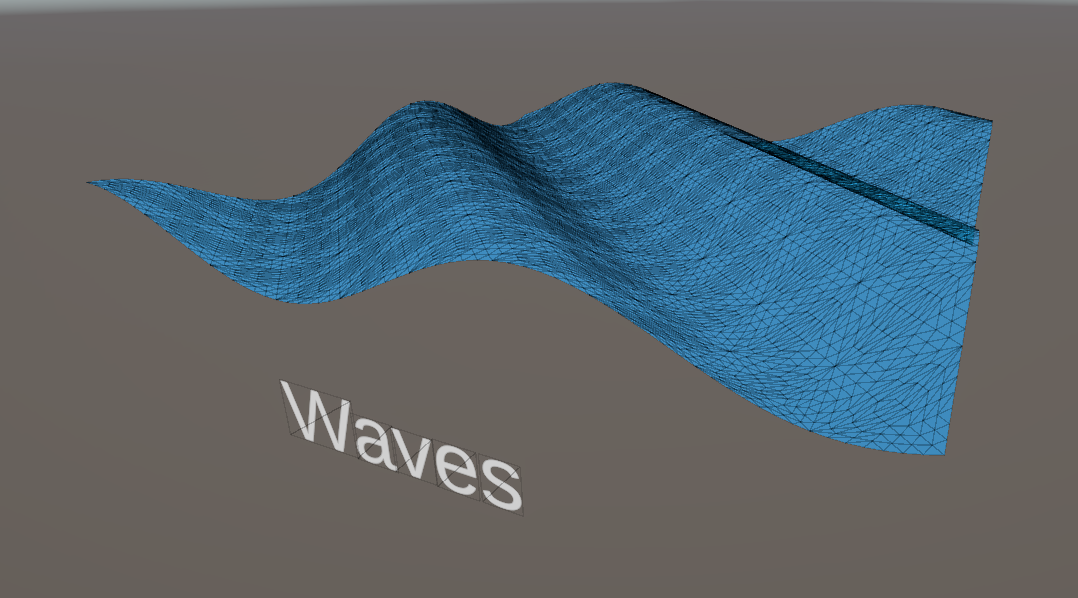
This also makes it a little easier to demonstrate how the fade-out over distance looks, with an fairly extreme example where the fade-out goes from none at the near edge of the mesh to full at the far end:
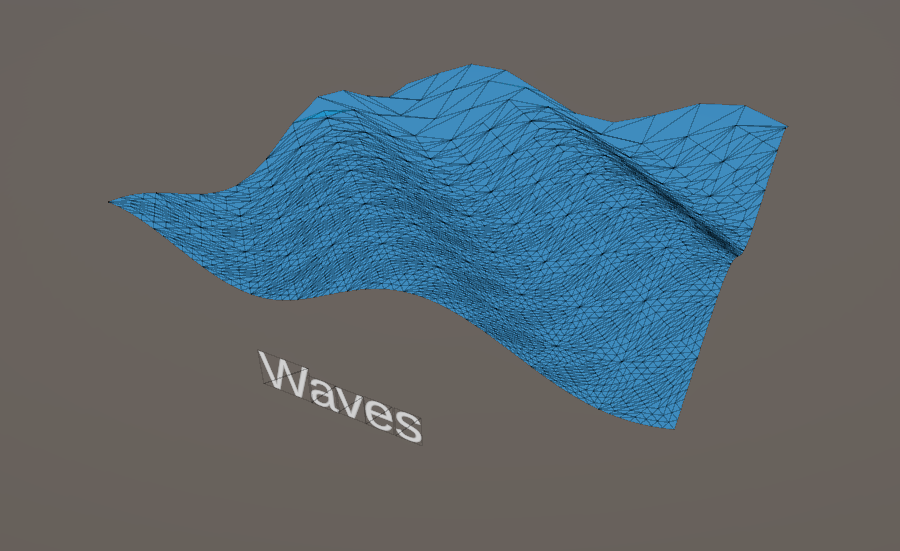
You could probably go ahead and replace the original plane mesh with a simple quad mesh and get the best of all worlds here: very low vertex count when viewing the wave mesh from far away, and a high tessellation amount for a high-fidelity wave when viewed up close.
This tutorial about vertex displacement turned mostly into a tutorial about tessellation, and I hope that goes to show just how complex tessellation can be. I hope you learned something cool about the graphics pipeline! In the next Part of the series, we will learn all about using lighting information in shaders. It ended up being quite a juggernaut topic, so writing up this Part 5 article a couple months late means I can give you the perspective that I wrote and recorded Part 6 not long after the Part 5 video went out, then stalled on producing the video because it’s so dense. It will come eventually! Until then, have fun making shaders!
Here is the full TessellatedWaves shader for you to compare your own version with:
Shader "Basics/TessellatedWaves"
{
    Properties
    {
        _BaseColor("Base Color", Color) = (1, 1, 1, 1)
        _BaseTexture("Base Texture", 2D) = "white" {}
        _WaveHeight("Wave Height", Range(0.0, 1.0)) = 0.25
        _WaveSpeed("Wave Speed", Range(0.0, 10.0)) = 1.0
        _TessellationAmount("Tessellation Amount", Range(1.0, 64.0)) = 1.0
        _TessellationFadeStart("Tessellation Fade Start", Float) = 25
        _TessellationFadeEnd("Tessellation Fade End", Float) = 50
        [Enum(UnityEngine.Rendering.BlendMode)] _SrcBlend("Source Blend Mode", Integer) = 5
        [Enum(UnityEngine.Rendering.BlendMode)] _DstBlend("Destination Blend Mode", Integer) = 10
    }
    SubShader
    {
        Tags
        {
            "RenderPipeline" = "UniversalPipeline"
            "RenderType" = "Transparent"
            "Queue" = "Transparent"
        }

        Pass
        {
            Blend [_SrcBlend] [_DstBlend]
            ZWrite Off

            HLSLPROGRAM
            #pragma vertex vert
            #pragma fragment frag
            #pragma hull hull
            #pragma domain domain

            #include "Packages/com.unity.render-pipelines.universal/ShaderLibrary/Core.hlsl"

            CBUFFER_START(UnityPerMaterial)
                float4 _BaseColor;
                float4 _BaseTexture_ST;
                float _WaveHeight;
                float _WaveSpeed;
                float _TessellationAmount;
                float _TessellationFadeStart;
                float _TessellationFadeEnd;
            CBUFFER_END

            TEXTURE2D(_BaseTexture);
            SAMPLER(sampler_BaseTexture);

            struct appdata
            {
                float4 positionOS : POSITION;
                float2 uv : TEXCOORD0;
            };

            struct tessControlPoint
            {
                float3 positionWS : INTERNALTESSPOS;
                float2 uv : TEXCOORD0;
            };

            struct tessFactors
            {
                float edge[3] : SV_TessFactor;
                float inside  : SV_InsideTessFactor;
            };

            struct t2f
            {
                float4 positionCS : SV_POSITION;
                float2 uv : TEXCOORD0;
            };

            tessControlPoint vert(appdata v)
            {
                tessControlPoint o = (tessControlPoint)0;

                o.positionWS = TransformObjectToWorld(v.positionOS.xyz);
                o.uv = TRANSFORM_TEX(v.uv, _BaseTexture);

                return o;
            }

            [domain("tri")]
            [outputcontrolpoints(3)]
            [outputtopology("triangle_cw")]
            [partitioning("integer")]
            [patchconstantfunc("patchConstantFunc")]
            tessControlPoint hull(InputPatch<tessControlPoint, 3> patch, uint id : SV_OutputControlPointID)
            {
                return patch[id];
            }

            tessFactors patchConstantFunc(InputPatch<tessControlPoint, 3> patch)
            {
                tessFactors f = (tessFactors)0;

                float3 triPos0 = patch[0].positionWS;
                float3 triPos1 = patch[1].positionWS;
                float3 triPos2 = patch[2].positionWS;

                float3 edgePos0 = 0.5f * (triPos1 + triPos2);
                float3 edgePos1 = 0.5f * (triPos0 + triPos2);
                float3 edgePos2 = 0.5f * (triPos0 + triPos1);

                float3 camPos = _WorldSpaceCameraPos;

                float dist0 = distance(edgePos0, camPos);
                float dist1 = distance(edgePos1, camPos);
                float dist2 = distance(edgePos2, camPos);

                float fadeDist = _TessellationFadeEnd - _TessellationFadeStart;

                float edgeFactor0 = saturate(1.0f - (dist0 - _TessellationFadeStart) / fadeDist);
                float edgeFactor1 = saturate(1.0f - (dist1 - _TessellationFadeStart) / fadeDist);
                float edgeFactor2 = saturate(1.0f - (dist2 - _TessellationFadeStart) / fadeDist);

                f.edge[0] = max(edgeFactor0 * _TessellationAmount, 1);
                f.edge[1] = max(edgeFactor1 * _TessellationAmount, 1);
                f.edge[2] = max(edgeFactor2 * _TessellationAmount, 1);

                f.inside = (f.edge[0] + f.edge[1] + f.edge[2]) / 3.0f;

                return f;
            }

            [domain("tri")]
            t2f domain(tessFactors factors, OutputPatch<tessControlPoint, 3> patch, float3 barycentricCoordinates : SV_DomainLocation)
            {
                t2f i = (t2f)0;

                float3 positionWS = patch[0].positionWS * barycentricCoordinates.x +
                    patch[1].positionWS * barycentricCoordinates.y +
                    patch[2].positionWS * barycentricCoordinates.z;

                float2 uv = patch[0].uv * barycentricCoordinates.x +
                    patch[1].uv * barycentricCoordinates.y +
                    patch[2].uv * barycentricCoordinates.z;

                float waveHeight = sin(positionWS.x + positionWS.z + _Time.y * _WaveSpeed) * _WaveHeight;
                float3 newPositionWS = float3(positionWS.x, positionWS.y + waveHeight, positionWS.z);

                i.positionCS = TransformWorldToHClip(newPositionWS);
                i.uv = uv;

                return i;
            }

            float4 frag(t2f i) : SV_TARGET
            {
                float4 textureColor = SAMPLE_TEXTURE2D(_BaseTexture, sampler_BaseTexture, i.uv);
                return textureColor * _BaseColor;
            }

            ENDHLSL
        }
    }
}
Subscribe to my Patreon for perks including early access, your name in the credits of my videos, and bonus access to several premium shader packs!